Key Concepts
Key Concepts
Participant vs trainer role
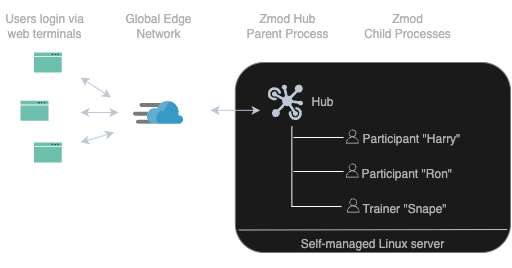
- Participants are the primary trainees. They can request help, arrange panes and chat with trainers. They cannot see or connect to other participants.
- Trainers have elevated privileges, assistance features and different views. For example, they see when participants request help and can connect to their terminals. Assign a trainer role to all teachers and assistants.
The Agent
The agent is the main process managing a training session, initiated via shellroom start.
Each user (participant or trainer) runs a separate shellroom process, and the Agent process brings all together into one training session.
It connects to the web terminals and spawns a child process when a new user opens a web terminal.
Standard vs non-standard setup
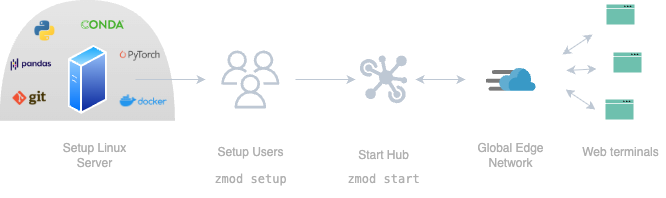
The standard setup is an opionated way to run shellroom, leveraging Linux’ system user and login for authentication and web-terminal for access.
Non-standard ways to run:
- Virtual login mode - no separate system users are created.
Instead, all users will run under the same system account as the one that started the agent.
When users access the browser link, a login form is displayed.
For authentication, the agent matches username/password against the provided users csv file.
Then, a normal login shell is opened.
Invoke with
shellroom start --login virtual - SSH use - users log in via SSH. You manage the user authentication. You can disable the file server.
- Roll-your-own setup - just make sure to start the agent with
shellroom startand that users can join the session withshellroom join.